merci pour les infos
je vais chercher un peu plus sur internet et voir pour la programmation si vraiment nécessaire
[Tuto] Contrôler sa chaudière Viessmann avec Domoticz via une interface infrarouge
Re: Contrôler sa chaudière Viessmann avec Domoticz via une interface infrarouge
Bonjour; Je vais me realiser le petit module de connexion, Avant que je commande, est-ce que quelqu'un aurait une paire de led en rab a me vendre ? Merci !
Re: Contrôler sa chaudière Viessmann avec Domoticz via une interface infrarouge
bonsoir
il me reste qq SFH 487-2
les autres se trouvent sur internet plus facilement
possible de discuter des modalités par mail
il me reste qq SFH 487-2
les autres se trouvent sur internet plus facilement
possible de discuter des modalités par mail
Re: Contrôler sa chaudière Viessmann avec Domoticz via une interface infrarouge
Bonjour,
Sachant que je possède mon serveur sur ESXI, avec plusieurs VM ( Jeedom, Domoticz dans le passé ) , et Xpenology pour la partie NAS.
J'ai donc créer une VM sous 2Ghz 2Go de Ram avec Raspbian installé dessus, et cela tourne très fort

J'ai reçu mon Optolink ( origine ) j'ai pas mal avancé mais je sèche sur un point, et je voulais avoir vos feedback....
- L'interface à l'air UP, mais avec la commande : "sudo vitalk -t /dev/ttyUSB0" le protocole n'a pas l'air de s'initialiser Try Proto 300 Init: failed....
- Pourtant via la commande "vcontrold -n" puis "telnet localhost 3002" j'arrive à interroger temperature, bruleur,etc... & recevoir les infos de la chaudière ( voir les autres terminal.... )
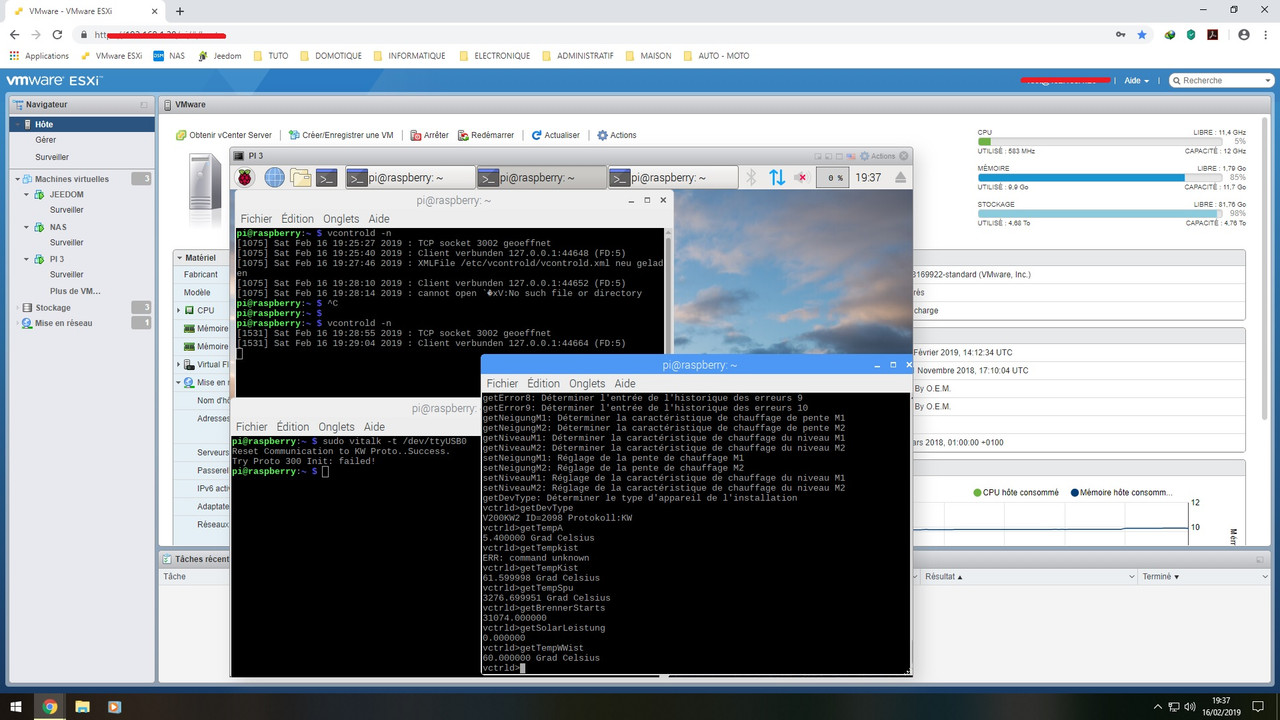
Quelqu'un aurait une idée ?
PS: J'ai testé en suivant les différents tutos....
viewtopic.php?f=17&t=1955
https://www.bricozone.fr/t/interface-vi ... -pi.14671/
https://github.com/openv/openv/wiki/vco ... spberry-Pi
Sachant que je possède mon serveur sur ESXI, avec plusieurs VM ( Jeedom, Domoticz dans le passé ) , et Xpenology pour la partie NAS.
J'ai donc créer une VM sous 2Ghz 2Go de Ram avec Raspbian installé dessus, et cela tourne très fort
J'ai reçu mon Optolink ( origine ) j'ai pas mal avancé mais je sèche sur un point, et je voulais avoir vos feedback....
- L'interface à l'air UP, mais avec la commande : "sudo vitalk -t /dev/ttyUSB0" le protocole n'a pas l'air de s'initialiser Try Proto 300 Init: failed....
- Pourtant via la commande "vcontrold -n" puis "telnet localhost 3002" j'arrive à interroger temperature, bruleur,etc... & recevoir les infos de la chaudière ( voir les autres terminal.... )
Quelqu'un aurait une idée ?
PS: J'ai testé en suivant les différents tutos....
viewtopic.php?f=17&t=1955
https://www.bricozone.fr/t/interface-vi ... -pi.14671/
https://github.com/openv/openv/wiki/vco ... spberry-Pi
Re: Contrôler sa chaudière Viessmann avec Domoticz via une interface infrarouge
hello
j'ai eu aussi qq difficultés...
J'ai fait un bilan ici avec qq points d'attention
viewtopic.php?f=17&t=1955&start=440#p62381
si cela peut servir
j'ai eu aussi qq difficultés...
J'ai fait un bilan ici avec qq points d'attention
viewtopic.php?f=17&t=1955&start=440#p62381
si cela peut servir
Re: Contrôler sa chaudière Viessmann avec Domoticz via une interface infrarouge
Tu es sur de ton ttyUSB0 ? Avec ta VM, il a peut-être un autre nom....street848 a écrit : 16 févr. 2019, 17:44 Bonjour,
Sachant que je possède mon serveur sur ESXI, avec plusieurs VM ( Jeedom, Domoticz dans le passé ) , et Xpenology pour la partie NAS.
J'ai donc créer une VM sous 2Ghz 2Go de Ram avec Raspbian installé dessus, et cela tourne très fort
- L'interface à l'air UP, mais avec la commande : "sudo vitalk -t /dev/ttyUSB0" le protocole n'a pas l'air de s'initialiser Try Proto 300 Init: failed....
Domotisation de : mes compteurs EDF, solaire, eau / mon alarme / ma Chaudière Viessamnn / mon congel / ma sonnette. Matériels : Pi2 - RFXTrx433e - Zwave+ Aeotec, ampoules Hue - Détecteur et prises Fibaro - Capteurs Oregon - présentation installation => lien
Re: Contrôler sa chaudière Viessmann avec Domoticz via une interface infrarouge
Oui je confirme accessible soit via ttyUSB0 ou vitoir0
Re: Contrôler sa chaudière Viessmann avec Domoticz via une interface infrarouge
essaye avec la commande: ls -l /dev/tty*
Ensuite, vérifie le fichier vitalk et change la ligne ci-dessous, si la liaison avec Optolink s’effectue par une interface USB/Serial.
Dans le fichier vitalk, recherche DAEMON_ARGS="-t /dev/vitoir0" et remplace par DAEMON_ARGS="-t /dev/ttyUSB0"
Cela permet de démarrer le deamon correctement.
Dans mon cas, j'utilise une liaison série. Il faut donc remplacer DAEMON_ARGS="-t /dev/vitoir0" par DAEMON_ARGS="-t /dev/ttyAMA0"
Re: Contrôler sa chaudière Viessmann avec Domoticz via une interface infrarouge
J'ai apporté quelques modifs au script python de jsm, qui m'a permis de découvrir ce langage... pour ajouter ce dont j'avais besoin pour piloter ma chaudière:
nombre de starts: sujet important pour moi car je crois que j'ai trop de starts, à voir l'hiver prochain!
un compteur de runtime incremental, pour savoir combien de temps la chaudière fonctionne par heure, par jour...
un indicateur pour savoir si elle est sur normal ou réduit en fonction de la programmation horaire
et aussi un nouveau calcul de la consommation en kW.h basé sur la puissance de la chaudière, pour plus de précision il faut faire tourner le calcul de conso souvent, j'ai donc ajouté un paramètre au script pour la conso seulement "gas". Je fais tourner la conso toutes les minutes et le reste toutes les 4 minutes
Pour aujourd’hui, je mets le code. Calcul de la consommation dans un autre post
/!\ comme je propose de mettre le RFXMeter/Counter Dividers dans Domoticz Setup à 1000 pour avoir le gaz en litres, pour garder l'historique des compteurs de gaz existants, il vaut mieux le faire dans le divice directement (Counter Diviser)
nombre de starts: sujet important pour moi car je crois que j'ai trop de starts, à voir l'hiver prochain!
un compteur de runtime incremental, pour savoir combien de temps la chaudière fonctionne par heure, par jour...
un indicateur pour savoir si elle est sur normal ou réduit en fonction de la programmation horaire
et aussi un nouveau calcul de la consommation en kW.h basé sur la puissance de la chaudière, pour plus de précision il faut faire tourner le calcul de conso souvent, j'ai donc ajouté un paramètre au script pour la conso seulement "gas". Je fais tourner la conso toutes les minutes et le reste toutes les 4 minutes
Code : Tout sélectionner
#!/usr/bin/python
# domo2vito
# JS MARTIN# version 2.11 - 07-03-2017
# version 2.20 - PBR - 31-03-2019:
# add starts (number of starts of the burner), incremental boiler-runtime in hx100
# use update_device_status function, get_last_user_variable_value and set_user_variable_value
# consumption calculation in kWh and new calculation for gaz in m3
# parameter to calulate consumption only (more often to get accuracy results)
# update Domoticz with reduced time info
# /!\ see RFXMeter/Counter Dividers in Domoticz Setup ; I set 1000 to get gas in liter
import telnetlib
import sys
import os
import time
import datetime
import requests
from requests.auth import HTTPBasicAuth
import json
#~~~~~~~~~~~~~~~~~~~~~~~~~~~~~~~~~~~~~
# Mode log_Info
#~~~~~~~~~~~~~~~~~~~~~~~~~~~~~~~~~~~~~
log_Info=True # basic info about execution
log_Detail=False # more info about execution
if log_Info:
print 'Start '+time.strftime("%H")+':'+time.strftime("%M")
from timeit import default_timer as timer
startTimer = timer()
############# Parameters #################################
#~~~~~~~~~~ Parameters Domoticz ~~~~~~~~~~~~~~~~~~~~~~~~~~~~~~~~~~~~~~~~~~~
domoticz_ip='hestia' #IP or DNS
domoticz_port='8080'
user=''
password=''
#~~~~~~~~~~~~~~~~~~~~~~~~~~~~~~~~~~~~~~~~~~~~~~~~~~~~~~~~~~~~~~~~~~~~~~~~~~
#~~~~~~~~~~~~~~~~~~~~~~~~~~~~~~~~~~~~~
# Commands viTalk and Addresses
#~~~~~~~~~~~~~~~~~~~~~~~~~~~~~~~~~~~~~
#autorized commands
commands = ["mode","saving","party","party_soll_temp","outdoor_temp","raum_soll_temp","raum_ist_temp","k_ist_temp","ww_soll_temp","ww_ist_temp","k_abgas_temp","power","errors","runtime","red_raum_soll_temp", "starts"]
#write only commands
write_only_commands = ["mode","saving","party","party_soll_temp","ww_soll_temp","red_raum_soll_temp","raum_soll_temp"]
#commands for consumption calculation
consumption_commands = ["power","runtime"] #, "starts"] # commented if necessary in the future
# addresses for reduce mode time intervals
V_addresses=["2000","2008", "2010", "2018", "2020", "2028", "2030"]
#~~~~~~~~~~~~~~~~~~~~~~~~~~~~~~~~~~~~~
# IDX de Domoticz
#~~~~~~~~~~~~~~~~~~~~~~~~~~~~~~~~~~~~~
# widget to create, idx to set
dummy_idx={'mode':346, 'saving':347, 'party':348, 'party_soll_temp':349, 'outdoor_temp':350, 'raum_soll_temp':351, 'raum_ist_temp':352, 'k_ist_temp':353, 'ww_soll_temp':354, 'ww_ist_temp':355, 'k_abgas_temp':356, 'power':357, 'error_log':358, 'problem':359, 'delta-rt': 365, 'delta-incr-rt': 420, 'gas':361, 'gasLiter':431, 'red_raum_soll_temp':362, 'holiday_temp':363, 'raum_soll_temp_W':364, 'incr_starts':393, 'gaskWh':432, 'reduce_mode':427}
# 0 mode : dummy selector switch OFF/Water/Heating (Boiler [FR:chaudiere] stand-by/water only/water+heating) {read/write}
# 1 saving : dummy switch ON/OFF (Boiler eco ON/OFF) {read/write}
# 2 party : dummy switch ON/OFF (party temporary manual control) - note : party ON does not work (vitalk bug ?) {read/write}
# 3 party_soll_temp : dummy thermostat setpoint (party temperature) {write only}
# 4 outdoor_temp : dummy temp (outdoor temperature) {read only}
# 5 raum_soll_temp : dummy temp (heating [FR:consigne] temperature ) {read only} - note : without vitotronic, you could use thermostat setpoint
# 6 raum_ist_temp : dummy temp (heating current [FR:actuelle] temperature) {read only}
# 7 k_ist_temp : dummy temp (boiler current temperature) {read only}
# 8 ww_soll_temp : dummy thermostat setpoint (hot water setpoint temperature) {write only}
# 9 ww_ist_temp : dummy temp (hot water current temperature) {read only}
#10 k_abgas_temp : dummy temp (exhaust gas [FR:gaz evacue'] temperature) {read only}
#11 power : dummy percentage (% boiler power) {read only}
#12 error_log : dummy alert (show the two last log codes) {read only}
# problem : dummy switch (set switch to On if there is a internal boiler problem)
#13 runtime : dummy custom sensor [seconds] (Operating time of boiler since last script call) {read only}
#13 runtime : dummy incremental counter sensor [hours with 2 decimals x100] no incremental counter with decimals
# gas : dummy incremental counter [gas] (Estimation of Gas consumption)
# gaskWh : dummy incremental counter [gas] (Estimation of kW.h consumption)
#14 red_raum_soll_temp: dummy thermostat setpoint (reduced temperature) {write only}
# holiday_temp : dummy thermostat setpoint (holiday temperature)
# raum_soll_temp_W : dummy thermostat setpoint (normal temperature) {write only} - note: does not work with vitotrol 300
# for raum_soll_temp_W, you need to put the bolean Use_normal_temperature_setpoint to True
#15 incr_starts : dummy incremental counter (number of starts of the burner) {read only}
# reduce_mode : dummy selector switch Reduced/Normal according to normal times slot set in the boiler (calculated)
# User variables:
# boilerRuntime [integer]:overall boiler time in seconds persistance
# boilerKWhToM3 [float]: coeff to convert kW.h to gas m3 (to get from your gas provider)
# boilerPowerAjust [float]: coeff to adjust consumption calculation (due to error about power of the boiler, others...)
# boilerPowerAverage [float]: boiler power moving average persistance
user_idx={'boilerRuntime':6, 'boilerKWhToM3':3, 'boilerPowerAjust':4, 'boilerPowerAverage':5}
#~~~~~~~~~~~~~~~~~~~~~~~~~~~~~~~~~~~~~
# Variable
#~~~~~~~~~~~~~~~~~~~~~~~~~~~~~~~~~~~~~
#Boiler power
BoilerPower=26 #Max power of the boiler in kW
#Debit max gas (need to be adjust to synchronize estimated and real gas consumption)
Deb=0.8137
# Activated normal temperature setpoint
Use_normal_temperature_setpoint=True
#######################################################################
###### viTalk_connect() : connect to viTalk localhost:83
#######################################################################
def viTalk_connect():
global log_Info
retry=3
while retry!=0:
try:
tn = telnetlib.Telnet("localhost", 83)
if log_Info:
print "Connected to viTalk telnet !"
return tn
except:
print "Connection ERROR - I try to restart viTalk deamon"
#I try to restart viTalk
cmd = 'sudo service vitalk restart'
os.system(cmd)
time.sleep(10)
retry-=1
else:
tn.read_until(b"$", 5)
if retry==0:
tn.close()
print "Connection ERROR - I could not restart viTalk deamon"
sys.exit()
####
#######################################################################
###### viTalk_read(cmd) : read a value
#######################################################################
def viTalk_read(cmd):
global log_Info
global tn
retry=3
value=""
while retry!=0:
tn.read_until(b"$", 5)
if log_Detail: print "cmd="+cmd
tn.write(b"g "+cmd+"\n")
value=tn.read_until(b"$", 5).strip("\n$")
if value!="" and value!='NULL':
break
retry-=1
if retry==0:
print "Connection ERROR - I try to restart viTalk deamon"
os.system('sudo service vitalk restart')
#tn.close()
print(cmd+": "+value+" error")
sys.exit()
value = value.strip("\n$")
if log_Info:
print "get "+cmd+" : answer = "+value
return value
####
#######################################################################
###### viTalk_read_address(addr) : read the value of an address
#######################################################################
def viTalk_read_address(addr):
global log_Info
global tn
retry=3
value=""
while retry!=0:
tn.read_until(b"$", 5)
tn.write(b"rg "+addr+"\n")
value=tn.read_until(b"$", 5).strip("\n$")
if value!="" and value!='NULL':
break
retry-=1
if retry==0:
print "Connection ERROR - I try to restart viTalk deamon"
os.system('sudo service vitalk restart')
#tn.close()
print(addr+": "+value+" error")
sys.exit()
value = value.strip("\n$")
if log_Detail:
print "read address "+addr+" : answer = "+value
return value
####
#######################################################################
###### viTalk_check() : test viTalk and restart it if needed
#######################################################################
def viTalk_check():
global log_Info
global tn
retry=3
value=""
while retry!=0:
tn.read_until(b"$", 5)
tn.write(b"g saving \n")
value=tn.read_until(b"$", 5).strip("\n$")
if value!="" and value!='NULL':
if log_Info:
print "Check viTalk data OK ! (no NULL data received)"
break
retry-=1
if retry==0:
print "Connection ERROR - I try to restart viTalk deamon"
os.system('sudo service vitalk restart')
sys.exit()
####
#######################################################################
###### viTalk_set(cmd,val) : unsecured write
#######################################################################
def viTalk_set(cmd,val):
global log_Info
global tn
if cmd!="mode":
tn.write(b"s "+cmd+" "+val+"\n")
else: # vitalk does not manage mode 3 and 4 => raw set directly
tn.write(b"rs 2323 "+val+"\n")
tn.read_until(b"$", 5).strip("\n$")
if log_Info: print("set "+cmd+" "+val)
####
#######################################################################
###### viTalk_write(cmd,val) : secured write (I check if value is
###### really
#######################################################################
def viTalk_write(cmd,val):
global log_Info
global tn
retry=3
value=""
while retry!=0:
viTalk_set(cmd,val)
tn.read_until(b"$", 5)
time.sleep(1)
value=viTalk_read(cmd)
if val==value:
break
retry-=1
if retry==0:
tn.close()
print(cmd+" "+val+" : error")
sys.exit()
if log_Info:
print "check last command set "+cmd+" "+val+" : OK"
####
#######################################################################
###### check_command(cmd) : is it an authorized command ?
#######################################################################
def check_command(cmd):
global commands
global log_Info
try:
#check position of cmd in commands list
commands.index(cmd)
except:
print "command not found"
return False
else:
if log_Info:
print "this command "+cmd+" is known"
return True
####
#######################################################################
###### check_set_command(cmd) : is it an authorized write command ?
#######################################################################
def check_set_command(cmd):
global commands
global log_Info
try:
#check position of cmd in write only commands list
write_only_commands.index(cmd)
except:
print "set command not found (I can't write with this command)"
return False
else:
if log_Info:
print "this command "+cmd+" is known for writing"
return True
####
########################################################################
###### get_device_status(idx) : get current value for the device
########################################################################
def get_device_status(idx):
r = requests.get('http://'+domoticz_ip+':'+domoticz_port+'/json.htm?type=devices&rid='+str(idx),auth=HTTPBasicAuth(user,password))
status=r.status_code
if status == 200:
r=r.json()
result={}
return r['result'][0]['Data']
else:
print "Get device value - IDX:"+str(idx)+" not found ?"
####
########################################################################
###### update_device_status(idx, nval, sval) : update current value for the device
########################################################################
def update_device_status(idx, nval, sval):
if log_Detail:
print "update_device_status idx: " +idx+ " nval: " +str(nval)+ " sval: " +sval
req='http://'+domoticz_ip+':'+domoticz_port+'/json.htm?type=command¶m=udevice&idx='+idx+'&nvalue='+str(nval)+'&svalue='+sval
requests.get(req,auth=HTTPBasicAuth(user,password))
####
########################################################################
###### update_device_switch(idx, cmd) : update switch device to domoticz
########################################################################
def update_device_switch(idx, cmd):
if log_Detail:
print "update_device_switch idx: " +idx+ " cmd: " +cmd
req='http://'+domoticz_ip+':'+domoticz_port+'/json.htm?type=command¶m=switchlight&idx='+idx+'&switchcmd='+cmd
requests.get(req,auth=HTTPBasicAuth(user,password))
####
########################################################################
###### get_last_user_variable_value(idx) : get last value from domoticz
########################################################################
def get_last_user_variable_value(idx):
r = requests.get('http://'+domoticz_ip+':'+domoticz_port+'/json.htm?type=command¶m=getuservariable&idx='+str(idx),auth=HTTPBasicAuth(user,password))
status=r.status_code
if status == 200:
r=r.json()
result={}
return r['result'][0]['Value']
else:
print "Get last user variable value error - IDX:"+str(idx)
####
########################################################################
###### set_user_variable_value(idx, vname, vval) : set user varialbe value to domoticz
########################################################################
def set_user_variable_value(idx, vname, vval):
if log_Detail:
print "set_user_variable_value idx: " +idx+ " vname: " +vname+ " vval: "+vval
req='http://'+domoticz_ip+':'+domoticz_port+'/json.htm?type=command¶m=updateuservariable&idx='+idx+'&vname='+vname+'&vtype=0&vvalue='+vval
requests.get(req,auth=HTTPBasicAuth(user,password))
###
#-----------------------------------### START ###--------------------------------------------#
# arguments in command line
nb_arg=len(sys.argv)-1
if nb_arg==0:
print "HELP : "
print "domo2vito gas : update boiler consumption in domoticz"
print "domo2vito update : update all domoticz values except boiler consumption"
print "domo2vito command : get command (e.g. domo2vito mode <=> get mode)"
print "domo2vito command value : set command value (e.g. domo2vito mode 1 <=> set mode 1)"
print "--> supported commands :"
for command in commands:
print " - "+command
if nb_arg==1 and sys.argv[1]!="update" and sys.argv[1]!="gas":
if check_command(sys.argv[1]):
if log_Info:
print "get "+sys.argv[1]
tn=viTalk_connect()
viTalk_read(sys.argv[1])
tn.close()
#-------------------------------## Gas consumption calculation only ##---------------------------#
if nb_arg==1 and sys.argv[1]=="gas":
tn=viTalk_connect()
viTalk_check()
values=[]
i=0
tn.read_until(b"$", 5)
for command in consumption_commands:
tn.write(b"g "+command+"\n")
value=tn.read_until(b"$", 5).strip("\n$")
if log_Info:
print str(i)+") command : get "+command+ " => "+value
values.append(value)
i+=1
if log_Info: print "+Gas consumption calculation since last script call:"
# Get previous boiler runtime value from Domoticz database (user variable)
last_rt=int(get_last_user_variable_value(user_idx['boilerRuntime']))
delta_rt=int(values[1])-last_rt # delta-runtime in seconds
# Update boiler-runtime since last update ("basic" in seconds)
update_device_status(str(dummy_idx['delta-rt']),0, str(delta_rt))
last_rt_h=get_device_status(dummy_idx['delta-incr-rt'])
last_rt_h=int(last_rt_h)
delta_rt_h=(int(values[1])/36-last_rt_h)
# Update boiler-runtime since last update (incremental in hoursx100)
update_device_status(str(dummy_idx['delta-incr-rt']),0, str(delta_rt_h))
# Set overall boiler runtime into Domoticz database (user variable)
set_user_variable_value(str(user_idx['boilerRuntime']), 'boilerRuntime', values[1])
param_boilerKWhToM3=float(get_last_user_variable_value(user_idx['boilerKWhToM3']))
param_boilerPowerAjust=float(get_last_user_variable_value(user_idx['boilerPowerAjust']))
if log_Detail:
print 'boilerKWhToM3: ' +str(param_boilerKWhToM3)
print 'boilerPowerAjust: ' +str(param_boilerPowerAjust)
# Get previous starts value from Domoticz database (user variable)
# commented => in the Update part
#last_st=int(get_device_status(dummy_idx['incr_starts']))
#delta_st=int(values[2])-last_st # delta starts
# Update starts since last update
#update_device_status(str(dummy_idx['incr_starts']),0, str(delta_st))
# Get previous power and moving average from Domoticz database (user variable)
# power: dummy percentage (% boiler power)
previous_power_value=float(get_device_status(dummy_idx['power'])[:-1]) # on supprime le % a la fin de la chaine
if log_Detail: print 'previous_power_value= '+str(previous_power_value)
moving_avg_power=float(get_last_user_variable_value(user_idx['boilerPowerAverage']))
# Update power to Domoticz widget
Vpower=float(values[0])
update_device_status(str(dummy_idx['power']),0, str(Vpower))
if Vpower <> 0:
moving_avg_power_new=int(round((moving_avg_power+Vpower)/2,0))
if log_Detail: print "update moving average: " +str(moving_avg_power_new)
set_user_variable_value(str(user_idx['boilerPowerAverage']), 'boilerPowerAverage', str(moving_avg_power_new))
# Comsuption estimation for gas in W.h
Wh_used=0
CalPower=0.
if delta_rt > 0:
# The power value to calculate the consumption is the higher between the current one and the previous one
CalPower=max(Vpower, previous_power_value)
if CalPower==0:
CalPower=moving_avg_power # the heating was between 2 runs of the script, we use the moving average instead of 0
if log_Info: print "short heating cycle => moving average " +str(moving_avg_power)
else:
if log_Info: print "heating cycle => max current " +str(Vpower) +" previous power: " +str(previous_power_value)
# Comsuption estimation for gas in energy W.h:
# the duration of the heating (h) : ex 35 seconds => 35 / 3600 h
# x the boiler power (kW) : 26 kW = 26 x 1000 W
# x a parametrer to adjust the boiler power or the imprecison of the power measur : ex 1
# x the power of the heating in % : ex 28,5%
# = 72,04167 W.h
Wh_used=delta_rt/3.6*BoilerPower*param_boilerPowerAjust*CalPower/100
# Comsuption estimation for gas in liters:
# Comsuption in W.h / coeff kW.h to m3 (https://www.grdf.fr/particuliers/services-gaz-en-ligne/coefficient-conversion)
# kW.h to m3 == W.h to L
gas_used_liter=Wh_used/param_boilerKWhToM3 # see RFXMeter/Counter Dividers in Domoticz Setup ; I set 1000 to get gas in liter
# Comsuption estimation for gas (liter) with fisrt method (JSM)
power_cycle_gas_used=(float(previous_power_value)+float(Vpower))/2
gas_used=delta_rt*Deb*power_cycle_gas_used/100 # see RFXMeter/Counter Dividers in Domoticz Setup ; I set 1000 to get gas in liter
if log_Info:
print "Runtime;VPower;P0;Wh;GazL;Gaz0;MobAvg"
print str(delta_rt) +";" +str(Vpower) +";" +str(power_cycle_gas_used) +";" +str(Wh_used) +";" +str(gas_used_liter) +";" +str(gas_used) +";" +str(moving_avg_power)
if log_Detail:
print " -Runtime (sec) = "+str(delta_rt)
#print " -Start (nb) = "+ str(delta_st)
print " -Power average (%) = "+ str(power_cycle_gas_used)
print " -Estimated Wh used = " +str(Wh_used)
print " -Estimated gas used (liter) = " +str(gas_used_liter)
print " -Estimated gas used (liter) = "+str(gas_used)
# Update gas in Domoticz: both calcul ; you can comment ones
# Update gas (m3): JSM
update_device_status(str(dummy_idx['gas']),0, str(gas_used))
# Update kw.h
update_device_status(str(dummy_idx['gaskWh']),0, str(Wh_used))
# Update gas (m3): NEW
update_device_status(str(dummy_idx['gasLiter']),0, str(gas_used_liter))
#----------------------------## Update w/o consumption calculation ##------------------------#
if nb_arg==1 and sys.argv[1]=="update":
tn=viTalk_connect()
viTalk_check()
values=[]
i=0
tn.read_until(b"$", 5)
for command in commands:
tn.write(b"g "+command+"\n")
value=tn.read_until(b"$", 5).strip("\n$")
if log_Detail:
print str(i)+") command : get "+command+ " => "+value
values.append(value)
i+=1
# Num of the week to retrieve the schedule of the day
daynum=datetime.datetime.today().weekday()
# Addresses for reduce mode time intervals
adr_i=V_addresses[daynum]
if log_Detail: print "day#: "+str(daynum)+" viTalk_read_address..."+adr_i
time_interval=viTalk_read_address(V_addresses[daynum]+" 8")
#tn.close()
if log_Detail: print "+Now I check if I need to update some values into Viessmann boiler or into Domoticz..."
mcur=time.localtime().tm_min # to update setpoint one time every hour - get minute of current hour
if mcur>40 and mcur<46: # Heartbeat - update setpoint in Domoticz one time per hour just to avoid "lost widget status"
setpoint_heartbeat=True
else:
setpoint_heartbeat=False
# party_soll_temp : get setpoint party_soll_temp and update boiler if needed
temp=int(float(get_device_status(dummy_idx['party_soll_temp'])))
if temp!=int(float(values[3])): #Viessmann ignore decimales
if temp<10: temp=10 # party mini temp
if temp>30: temp=30 # party maxi temp
if log_Info: print "3) party setpoint has changed : I update Viessmann boiler with party temperature = "+str(temp)
viTalk_set("party_soll_temp",str(temp))
else:
if setpoint_heartbeat:
update_device_status(str(dummy_idx['party_soll_temp']),0, str(temp))
# get setpoint ww_soll_temp and update boiler if needed
temp=int(float(get_device_status(dummy_idx['ww_soll_temp'])))
if temp!=int(float(values[8])): #Viessmann ignore decimales
if temp<20: temp=20 # hot water mini temp
if temp>70: temp=70 # hot water maxi temp
if log_Info: print "8) hot water setpoint has changed : I update Viessmann boiler with hot water temperature = "+str(temp)
viTalk_set("ww_soll_temp",str(temp))
else:
if setpoint_heartbeat:
update_device_status(str(dummy_idx['ww_soll_temp']),0, str(temp))
# holiday mode : emulated* holiday mode *I put boiler in permanent reduce mode with a custom holiday temp
if int(values[0])==3: # mode 'permanent reduce'
if log_Info: print "Holiday mode : I check if reduced temp. = domoticz holiday setpoint temp."
temp=int(float(get_device_status(dummy_idx['holiday_temp'])))
if temp!=int(float(values[14])):
if temp<10: temp=10 # holidays mini temp
if temp>30: temp=30 # holidays maxi temp
viTalk_set("red_raum_soll_temp",str(temp)) # Reduced temp = domoticz holiday temp
if log_Info: print "- I update reduced temperature with domoticz holiday setpoint temperature"
else:
# get setpoint red_raum_soll_temp and update boiler if needed
if log_Info: print "Not Holiday mode : I check if reduced temp. = domoticz reduced setpoint temp."
temp=int(float(get_device_status(dummy_idx['red_raum_soll_temp'])))
if temp!=int(float(values[14])): #Viessmann ignore decimales
if temp<10: temp=10 # reduced mini temp
if temp>30: temp=30 # reduced maxi temp
if log_Info: print "14) Reduced temp setpoint has changed : I update Viessmann boiler with reduced temperature = "+str(temp)
viTalk_set("red_raum_soll_temp",str(temp))
if Use_normal_temperature_setpoint:
if log_Info: print "Use_normal_temperature_setpoint => activated"
temp=int(float(get_device_status(dummy_idx['raum_soll_temp_W'])))
if temp!=int(float(values[5])): #Viessmann ignore decimales
if temp<10: temp=10 # reduced mini temp
if temp>30: temp=30 # reduced maxi temp
if log_Info: print "15) Normal temp setpoint has changed : I update Viessmann boiler with normal temperature = "+str(temp)
viTalk_set("raum_soll_temp",str(temp))
tn.close()
if setpoint_heartbeat:
temp=int(float(get_device_status(dummy_idx['holiday_temp'])))
if temp<10: temp=10 # holidays mini temp
if temp>30: temp=30 # holidays maxi temp
update_device_status(str(dummy_idx['holiday_temp']),0, str(temp))
temp=int(float(get_device_status(dummy_idx['red_raum_soll_temp'])))
if temp<10: temp=10 # reduced mini temp
if temp>30: temp=30 # reduced maxi temp
update_device_status(str(dummy_idx['red_raum_soll_temp']),0, str(temp))
if Use_normal_temperature_setpoint:
temp=int(float(get_device_status(dummy_idx['raum_soll_temp_W'])))
if temp<10: temp=10 # normal mini tempraum_soll_temp_W
if temp>30: temp=30 # normal maxi temp
update_device_status(str(dummy_idx['raum_soll_temp_W']),0, str(temp))
# mode (selector level : 0=OFF 10=water 20=heating 30=holidays 40=always On)
previous_value=get_device_status(dummy_idx['mode'])
if previous_value=="Off": previous_value="Set Level: 0 %"
if int(previous_value[11:-1])!=int(values[0])*10:
if log_Info: print "0) Value MODE has changed : I update domoticz with mode = "+values[0]
update_device_switch(str(dummy_idx['mode']), 'Set%20Level&level='+str(int(values[0])*10))
# saving : dummy switch ON/OFF (Boiler eco ON/OFF) : if a user modify boiler or vitotrol, update Domoticz
previous_value=get_device_status(dummy_idx['saving'])
if (previous_value=="On" and values[1]=="0") or (previous_value=="Off" and values[1]=="1"):
if log_Info: print "1) Value SAVING has changed : I update domoticz with saving = "+values[1]
if values[1]=="0":
update_device_switch(str(dummy_idx['saving']), 'Off')
else:
update_device_switch(str(dummy_idx['saving']), 'On')
# party : dummy switch ON/OFF (party temporary manual control) : if a user modify boiler or vitotrol, update Domoticz
previous_value=get_device_status(dummy_idx['party'])
if (previous_value=="On" and values[2]=="0") or (previous_value=="Off" and values[2]=="1"):
if log_Info: print "2) Value PARTY has changed : I update domoticz with party = "+values[2]
if values[2]=="0":
update_device_switch(str(dummy_idx['party']), 'Off')
else:
update_device_switch(str(dummy_idx['party']), 'On')
# outdoor_temp : dummy temp (outdoor temperature)
update_device_status(str(dummy_idx['outdoor_temp']),0, values[4])
# raum_soll_temp : dummy temp (heating setpoint [FR:consigne] temperature) - note : without vitotronic, use thermostat setpoint
update_device_status(str(dummy_idx['raum_soll_temp']),0, values[5])
# raum_ist_temp : dummy temp (heating current [FR:actuelle] temperature)
update_device_status(str(dummy_idx['raum_ist_temp']),0, values[6])
# k_ist_temp : dummy temp (boiler current temperature)
update_device_status(str(dummy_idx['k_ist_temp']),0, values[7])
# ww_ist_temp : dummy temp (hot water current temperature)
update_device_status(str(dummy_idx['ww_ist_temp']),0, values[9])
# k_abgas_temp : dummy temp (exhaust gas [FR:gaz evacue'] temperature)
update_device_status(str(dummy_idx['k_abgas_temp']),0, values[10])
# Get previous starts value from Domoticz database (user variable)
last_st=int(get_device_status(dummy_idx['incr_starts']))
delta_st=int(values[15])-last_st # delta starts
# Update starts since last update
update_device_status(str(dummy_idx['incr_starts']),0, str(delta_st))
if log_Detail: print " -Start (nb) = "+ str(delta_st)
# time calculation according to Viessanmm coding retrieve via vitalk
V_time=(int(time.strftime("%H"))*8+int(time.strftime("%M"))/10)
if log_Detail: print "V_time: "+str(V_time)
# normal time? Test if the boiler is inside a normal times slot (and not reduced slot)
time_intervals=""
time_intervals_list=time_interval.split(';')
i=0
time_inside=False
while i<8:
if log_Detail: print str(i) +" ; " +str(time_intervals_list[i]) +" ; " +str(V_time) +" ; " +str(time_intervals_list[i+1])
if int(time_intervals_list[i]) <= V_time and V_time < int(time_intervals_list[i+1]):
time_inside=True
break
i+=2
if log_Detail: print "Time inside normal interval? " +str(time_inside)
previous_value=get_device_status(dummy_idx['reduce_mode'])
if log_Detail: print "previous_value normal/reduced: "+previous_value
if (previous_value=="Off" and time_inside):
if log_Info: print "Time changed to normal slot: I update domoticz"
update_device_switch(str(dummy_idx['reduce_mode']), 'Set%20Level&level=10')
elif (previous_value!="Off" and not time_inside):
if log_Info: print "Time changed to reduce slot: I update domoticz"
update_device_switch(str(dummy_idx['reduce_mode']), 'Set%20Level&level=0')
if log_Info: print "+Now I check boiler error..."
# error_log : dummy alert (show the two last log codes)
# problem : dummy switch (set switch to On if there is a internal boiler problem)
#values[12]="123,255,235,244,244,244,244,244,244,244 ;"
V_error=values[12][0:3]
V_previous_error=values[12][4:7]
V_error_hexa=str(hex(int(V_error)))[2:4] # hexa convertion
V_previous_error_hexa=str(hex(int(V_previous_error)))[2:4] # hexa convertion
V_previous_error_state=get_device_status(str(dummy_idx['error_log']))[0:2]
V_previous_problem_state=get_device_status(str(dummy_idx['problem']))
if V_error=="000":
if log_Info: print " -no internal error : all it is OK"+" (previous code="+V_previous_error_hexa+")"
if V_previous_error_state!="OK": # I update error_log alert only if state is modified
svalue='OK (previous='+V_previous_error_hexa+')'
update_device_status(str(dummy_idx['error_log']),1, svalue)
if V_previous_problem_state=="On": # I update problem switch only if state is modified
if log_Info: print " -state of boiler error status changed (no problem): I update the Domotics boiler problem switch"
update_device_switch(str(dummy_idx['problem']), 'Off')
else:
if log_Info: print " -there is an internal error : code="+V_error_hexa+" ( previous ="+V_previous_error_hexa+")"
if V_previous_error_state!=V_error_hexa: # I update error_log alert only if state is modified
svalue=V_error_hexa+' error (previous='+V_previous_error_hexa+')'
update_device_status(str(dummy_idx['error_log']),4, svalue)
if V_previous_problem_state=="Off": # I update problem switch only if state is modified
if log_Info: print " -state of boiler error status changed (problem): I update the Domotics boiler problem switch"
update_device_switch(str(dummy_idx['problem']), 'On')
#----------------------------------------## Command ##---------------------------------------#
if nb_arg==2:
if check_set_command(sys.argv[1]):
if log_Info: print "set "+sys.argv[1]+" "+sys.argv[2]
tn=viTalk_connect()
viTalk_write(sys.argv[1],sys.argv[2])
tn.close()
if log_Info:
endTimer = timer()
print "End / elapsed: " +str(endTimer - startTimer)
/!\ comme je propose de mettre le RFXMeter/Counter Dividers dans Domoticz Setup à 1000 pour avoir le gaz en litres, pour garder l'historique des compteurs de gaz existants, il vaut mieux le faire dans le divice directement (Counter Diviser)
Re: Contrôler sa chaudière Viessmann avec Domoticz via une interface infrarouge
Explication de la méthode de calcul de la consommation de la chaudière du script du post précédent
viewtopic.php?f=17&t=1955&p=68033#p68033
La consommation de la chaudière en kW.h est la puissance (en kW) multipliée par la durée (en heure)
Ensuite le gaz consommé est obtenu en appliquant le coefficient de conversion entre kW.h et m3 donné par son fournisseur de gaz et par GRDF
https://www.grdf.fr/particuliers/servic ... conversion
et qui vaut environ 10, donc 1 kW.h vaut 0,1 m3, soit 100 litres de gaz
On peut obtenir les consommations sur son espace GRDF
https://monespace.grdf.fr/monespace/par ... au-de-bord
Si l'on connaît la puissance de sa chaudière, la mienne fait 26 kW, le % de puissance utilisé et la durée pendant laquelle la chaudière a chauffé, on calcule la consommation.
On obtient assez facilement le temps de chauffe (runtime, en secondes), la puissance de sa chaudière. Il est plus difficile d'obtenir la puissance moyenne pendant la durée de chauffe dans le mesure où l'on mesure toutes les 2 ou 3 ou 4 minutes, on peut donc rater des pics... et donc avoir des moyennes fausses, plutôt sous-estimées. Comme on rate des pics, j'ai considéré qu'il fallait prendre le max entre 2 mesures consécutives et non pas la moyenne.
D'autre part, il peut y avoir des cas où la chaudière démarre et s'arrête entre 2 mesures, runtime > 0 et power =0 (yc le power précédent) ;dans ce cas, je prends la moyenne mobile.
Exemple:
puissance de la chaudière (kW): 26 kW = 26 x 1000 W
runtime 35 secondes, soit 35 / 3600 en heures
power en % : ex 28%
=> consommation = 35 / 3600 * 26 * 1000 * 28 / 100 = 35 / 3,6 * 26 * 28 / 100 = 70,7 W.h, soit 0,07 kW.h
=> en litre = 70,7 / 11,06 = 6,6 litres
Mon script calcule la consommation en litre qui se trouve à m3 dans Domoticz dans la mesure où l'on a mis le Counter Dividers à 1000.
A noter que jsm trouve une valeur 10 fois plus petite en litres et pourtant une valeur correcte en m3 car le Counter Dividers est à 100 par défaut dans Domoticz.
J'ai ajouté un coefficient de correction, car on rate quelques pics ou alors ma chaudière fait un peu plus de 26kW, boilerPowerAjust, qui vaut 1,145 actuellement, soit un ajustement de 14,5% ; c'est une user variable pour pouvoir l'ajuster sans modifier le script.
Le coefficient kW.h vers m3 est aussi une user variable (boilerKWhToM3)
viewtopic.php?f=17&t=1955&p=68033#p68033
La consommation de la chaudière en kW.h est la puissance (en kW) multipliée par la durée (en heure)
Ensuite le gaz consommé est obtenu en appliquant le coefficient de conversion entre kW.h et m3 donné par son fournisseur de gaz et par GRDF
https://www.grdf.fr/particuliers/servic ... conversion
et qui vaut environ 10, donc 1 kW.h vaut 0,1 m3, soit 100 litres de gaz
On peut obtenir les consommations sur son espace GRDF
https://monespace.grdf.fr/monespace/par ... au-de-bord
Si l'on connaît la puissance de sa chaudière, la mienne fait 26 kW, le % de puissance utilisé et la durée pendant laquelle la chaudière a chauffé, on calcule la consommation.
On obtient assez facilement le temps de chauffe (runtime, en secondes), la puissance de sa chaudière. Il est plus difficile d'obtenir la puissance moyenne pendant la durée de chauffe dans le mesure où l'on mesure toutes les 2 ou 3 ou 4 minutes, on peut donc rater des pics... et donc avoir des moyennes fausses, plutôt sous-estimées. Comme on rate des pics, j'ai considéré qu'il fallait prendre le max entre 2 mesures consécutives et non pas la moyenne.
D'autre part, il peut y avoir des cas où la chaudière démarre et s'arrête entre 2 mesures, runtime > 0 et power =0 (yc le power précédent) ;dans ce cas, je prends la moyenne mobile.
Exemple:
puissance de la chaudière (kW): 26 kW = 26 x 1000 W
runtime 35 secondes, soit 35 / 3600 en heures
power en % : ex 28%
=> consommation = 35 / 3600 * 26 * 1000 * 28 / 100 = 35 / 3,6 * 26 * 28 / 100 = 70,7 W.h, soit 0,07 kW.h
=> en litre = 70,7 / 11,06 = 6,6 litres
Mon script calcule la consommation en litre qui se trouve à m3 dans Domoticz dans la mesure où l'on a mis le Counter Dividers à 1000.
A noter que jsm trouve une valeur 10 fois plus petite en litres et pourtant une valeur correcte en m3 car le Counter Dividers est à 100 par défaut dans Domoticz.
J'ai ajouté un coefficient de correction, car on rate quelques pics ou alors ma chaudière fait un peu plus de 26kW, boilerPowerAjust, qui vaut 1,145 actuellement, soit un ajustement de 14,5% ; c'est une user variable pour pouvoir l'ajuster sans modifier le script.
Le coefficient kW.h vers m3 est aussi une user variable (boilerKWhToM3)